


UDISE Plus Student Module 2026-27 Login - UDISE+ Student Portal, School Profile


The Department of School Education and Literacy runs the Unified District Information System for Education Plus (UDISE+) for managing student information via a centralised database. It is a portal for managing students’ educational records and personal information. The UDISE+ student portal can be accessed by school authorities via udiseplus.gov.in.
Click to log in to UDISE Plus Student Module 2026-27
This Story also Contains
- How to Log In to the UDISE+ Student Portal 2026-27?
- What Details are to be filled by Schools using the UDISE+ Student Module?
- Importance of UDISE+ Student Module

Schools can log in to the UDISE Plus student portal using their username and password to fill in the details of their students. After successful login and registration of the student, a PEN ID for each student is generated, which is also required for creating an APAAR ID for the student. It must be noted that students cannot register themselves via the UDISE website. Only school authorities can log in to the official UDISE website and add the students’ details and other information.
How to Log In to the UDISE+ Student Portal 2026-27?
Under the existing UDISE+ setup, student data is filled in by schools online and uploaded in real time. School authorities can visit the official UDISE+ website and follow the steps mentioned below to log in and add details of their enrolled students:
Go to the website: udiseplus.gov.in.
Click on ‘Login for All Modules’ given at the top right of the homepage.
Now, go to the ‘Student Module’ tab.
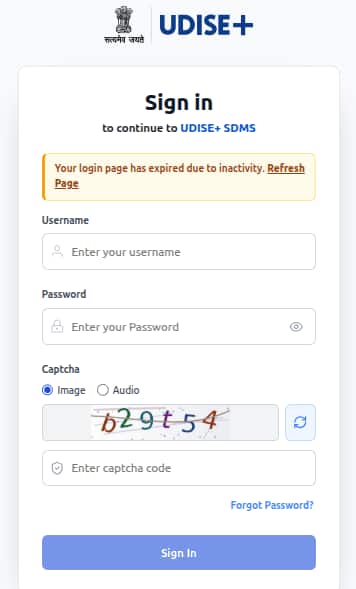
Sign in using the Username and Password that are provided by the Block MIS coordinator.
Do captcha code verification.
Now, click on the Sign In option.
Now, add the students’ details one by one carefully and check everything before submitting the details on the portal.
Sample Image of UDISE+ Student Module
What Details are to be filled by Schools using the UDISE+ Student Module?
School authorities use the UDISE+ Student Module 2026-27 to fill in academic and personal details of their students. Some of the details that are to be added in the UDISE+ Student Module are mentioned below:
Students name
Parents name
Admission year
Attendance
Health record
Family details
Confused between CGPA and Percentage?
Get your results instantly with our calculator!
Importance of UDISE+ Student Module
Some of the significant details and factors that make the UDISE+ student portal essential are listed below:
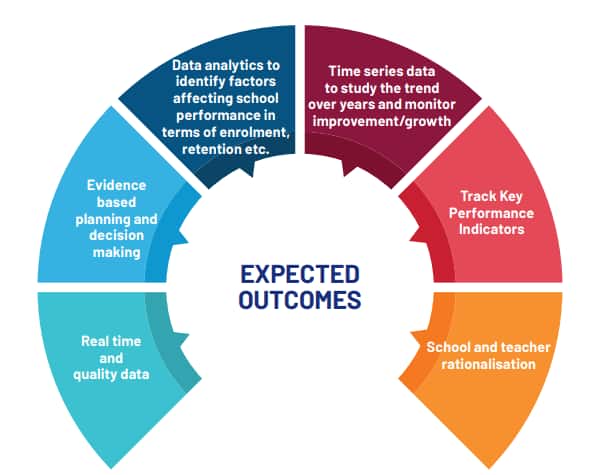
The data collected via the UDISE+ portal 2026-27 helps formulate new educational policies.
Resource allocation and planning can be done effectively by the Ministry of Education, Government of India.
After registering students, a unique PEN ID is created, which is further necessary for the students' APAAR ID creation.
Students’ progress and academic records are saved on this Student Database Management System (SDMS), which is effective in keeping a track record of the student even if the student transfers between schools.
Cross-sectional analysis of data can be done to study factors affecting student enrolment.
Other Benefits and Outcomes of UDISE+ Student Portal 2026-27
Frequently Asked Questions (FAQs)
The official website of UDISE+ is udiseplus.gov.in.
No, students cannot register themselves. Schools have to log in using their credentials and add the student data to the UDISE Plus student module.

Questions related to CBSE Class 10th
On Question asked by student community
Hello Student,
Could you mention your class? Check the useful resources given below:
https://school.careers360.com/boards/cbse/cbse-class-10th-question-bank
https://school.careers360.com/boards/cbse/cbse-class-10-maths-important-questions-and-answers
https://school.careers360.com/boards/cbse/cbse-class-10-science-most-repeated-questions-pdf
Hope it helps!
Hello student!
You can refer to the CBSE Class 10 Mathematics Question Paper 2026 to practise questions and prepare for the Mathematics examination.
https://school.careers360.com/boards/cbse/cbse-class-10-maths-question-paper-2026
Hope it helps!
Hi Smriti Lama
The CBSE Class 10 Board Exam 2026-27 question paper pattern includes the latest exam structure, subject-wise marking scheme and question types. You can check the detailed pattern on Careers360:
Hi Somshiv Rath
If you mean a CBSE Class 8 Science question paper, Careers360 has a sample paper section where you can check the available Class 8 papers.
https://learn.careers360.com/school/cbse-8-class-preparation-material/
Hey there,
If you mean CBSE Class 10 rechecking/re-evaluation results 2026, CBSE has already completed the main post-result process for 2026. The Class X second-board results were declared on 18 July 2026, and CBSE has also issued the post-result facilities notice.
For verification/re-evaluation, CBSE says the result/status is uploaded online