
Search Colleges, Exams, Schools & more


Login
DigiLocker CBSE 10th 12th Result 2026 Out - Download CBSE Results @digilocker.gov.in
Switch to

Switch to
CBSE Result DigiLocker - The Central Board of Secondary Education provides the facility of accessing the CBSE result scorecard 2026, passing certificate and migration certificate on the Digi Locker app. The CBSE 10th result marksheet and CBSE 12th result marksheet DigiLocker can be easily accessed via the application and official website: digilocker.gov.in. The CBSE Class XII results have been released on May 13, 2026, while the Class X results 2026 via DigiLocker were released on April 15, 2026.
CBSE 12th Result 2026: Direct link to check at DigiLocker
Download Marksheet: CBSE Class X Results 2026 Link
Live | Oct 10, 2026 | 5:33 PM IST
This Story also Contains
- CBSE Results 2026 DigiLocker: Date and Highlights
- CBSE DigiLocker Result 2026 - User Guide for Students
- DigiLocker Login - How to Access Dashboard?
- CBSE DigiLocker Result 2026 - New User Sign-up
Around 38.5 lakh students who were awaiting the results can now access the CBSE result on Digilocker 2026 online. They need to create their login credentials to fetch the documents, like the CBSE marksheet in DigiLocker. In this article, we have provided information for students who want to access their CBSE certificates on DigiLocker along with the CBSE result 2026. Read further to get all the details on how to access/download CBSE marksheet through Digilocker, CBSE Digilocker login process, benefits of Digilocker CBSE result 2026 and other important frequently asked queries related to CBSE digital locker.
CBSE Class XII Results 2026 on DigiLocker (Now Available)
CBSE Results 2026 DigiLocker: Date and Highlights
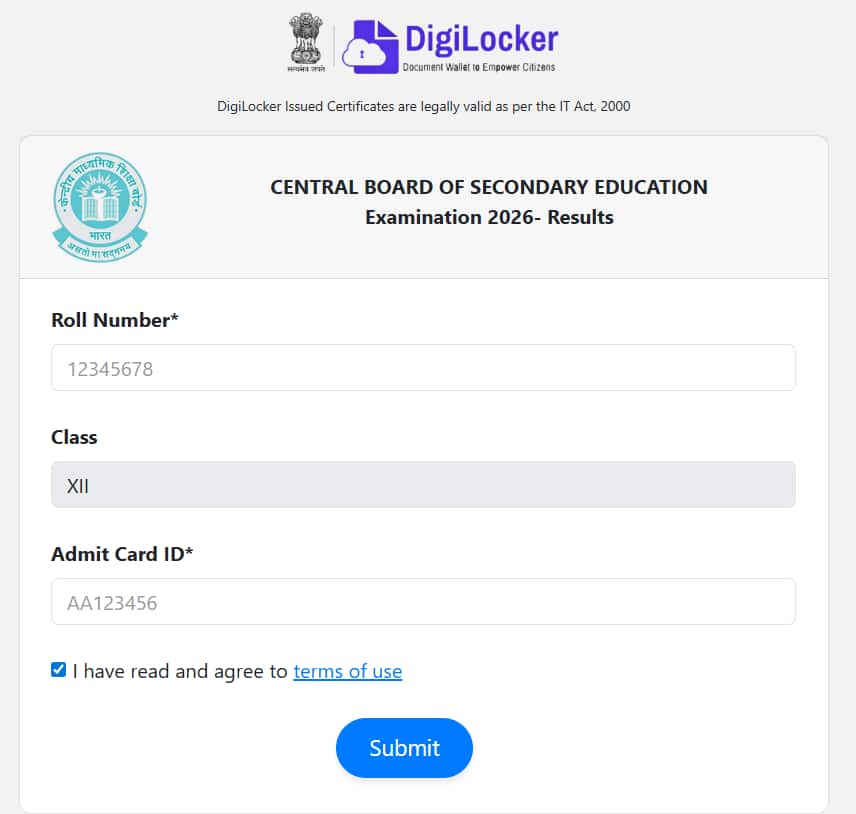
Around 38.5 lakh students who appeared for boards can access the CBSE result via DigiLocker online. They need to create their login credentials to fetch the documents, like the CBSE marksheet in DigiLocker. In this article, we have provided information for students who want to access their CBSE certificates on DigiLocker along with the CBSE result 2026. Refer to the table given below to get more information about the CBSE result 2026 on DigiLocker:
| Particulars | Details |
| CBSE result DigiLocker website | digilocker.gov.in/cbse cbse.digitallocker.gov.in results.digitallocker.gov.in |
| CBSE 10th exam dates | February 17 to March 11, 2026 (Phase I) |
| CBSE 12th exam dates | February 17 to April 10, 2026 |
| CBSE DigiLocker 10th result date 2026 | April 15, 2026 (Phase I) |
| CBSE DigiLocker 12th result date 2026 | May 13, 2026 |
What is the CBSE DigiLocker Access Code?
The Central Board of Secondary Education (CBSE) has introduced a six-digit access code system for Class 10 and 12 students to access their digital academic documents via DigiLocker securely. These access codes are distributed to schools through their DigiLocker accounts, and schools are responsible for sharing them individually with students.
CBSE DigiLocker Result 2026 - User Guide for Students
There are various methods of DigiLocker student login for accessing CBSE DigiLocker results 2026. Students who appeared for CBSE 10th exams and CBSE 12th exams should know the various methods to log in and access the CBSE Class 10 and CBSE 12th Marksheets cum Passing Certificate & Migration Certificate. The step-wise pointers are mentioned below:
How to Download CBSE Result Marksheet 2026 DigiLocker?
CBSE has directed the schools to provide the students with their unique individual Security PINs so that students can access their CBSE 2026 results through the DigiLocker app/DigiLocker website. The student-wise Security PIN file is made available to Schools in their DigiLocker accounts, from where schools can download and provide the Security PIN to individual students.
Steps to Login CBSE Result DigiLocker using Security PIN?
- Open the CBSE DigiLocker website at cbseservices.digilocker.gov.in/activatecbse
- Click on ‘Get Started with Account Confirmation’ as shown in the image below:
50+ Entrance Exams after 12th
Download this ebook to explore 50+ entrance exams after Class 12 for admission into top undergraduate colleges across engineering, management, law & more.
Download Now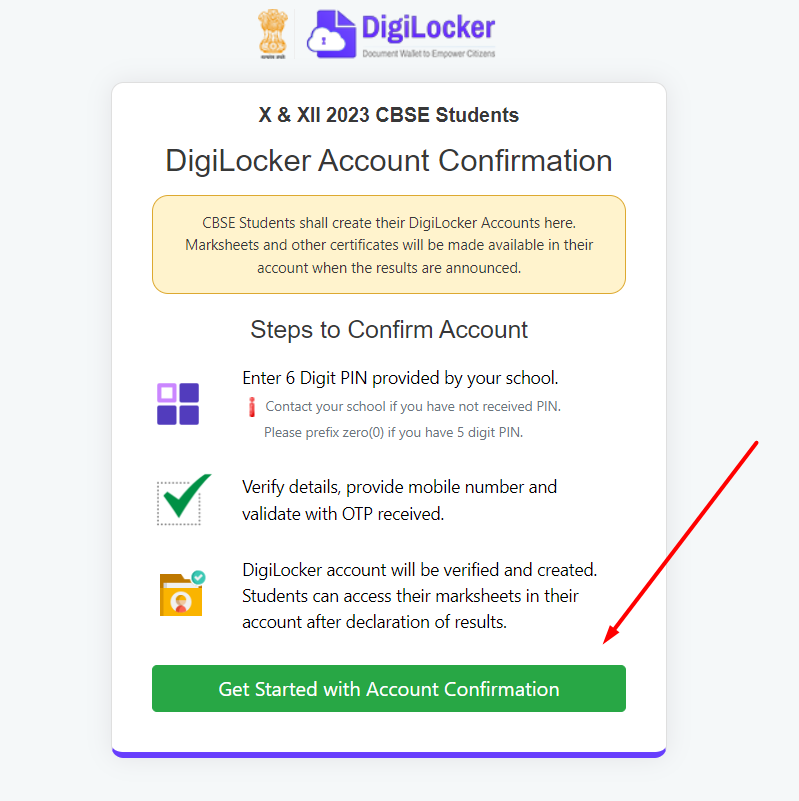
- Select Class, provide the school code, and roll number and enter the 6 Digit security PIN provided by the school as shown in the sample image below:
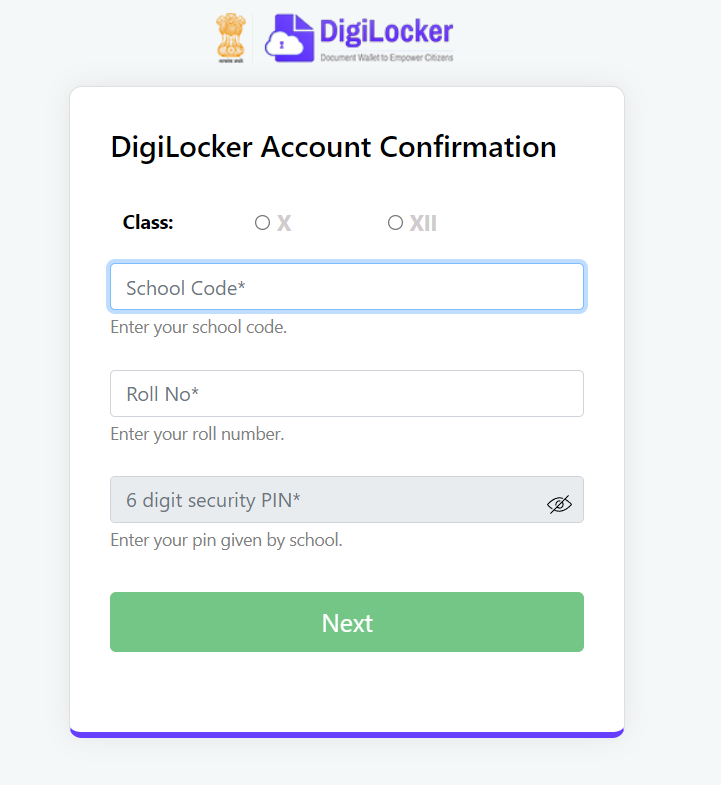
- Click on the ‘Next’ button.
- The student’s basic details will be displayed on the screen like Name and DOB. Now, enter the CSBE-registered mobile number and the student’s DOB. Click on the ‘Submit’ button.
- An OTP will be received on the provided mobile number. Enter that OTP and finally click on the ‘Submit’ button to confirm your CBSE Digital locker account confirmation process.
Note: After completing the CBSE DigiLocker account confirmation process, students can download their CBSE result mark sheet from the DigiLocker under the ‘Issued Documents’ section after the board declares the CBSE annual examination results 2026.
Confused between CGPA and Percentage?
Get your results instantly with our calculator!
💡 Conversion Formula used is: CGPA = Percentage / 9.5
DigiLocker Login - How to Access Dashboard?
The DigiLocker app has already created DigiLocker accounts of students using the mobile numbers shared by CBSE. Students can access their DigiLocker Login dashboard using their credentials, such as their mobile number and date of birth.
Steps to Login to DigiLocker Portal
- Visit the CBSE Digi Locker Login website at digilocker.gov.in/cbse
- Click on the ‘Sign In’ option on the homepage.
- Enter the registered mobile number, security pin and DOB as per CBSE.
- Students using DigiLocker for the first time can use ‘Forgot security PIN’ if they do not have the six-digit PIN.
- Enter the OTP received on the registered mobile number to log in to your CBSE DigiLocker account.
- Now, log in to the DigiLocker dashboard by submitting your credentials and accessing the documents.
CBSE Result DigiLocker - Steps to Download CBSE Marksheet/Certificates
After logging into the CBSE DigiLocker account with the process mentioned above. Students can now download their DigiLocker 10th mark sheet and DigiLocker CBSE 12th result 2026 mark sheet on the DigiLocker app or through the website.
Follow the pointers given below to download the statement of marks, CBSE board, migration certificate and CBSE passing certificate.
- After successful completion of the login process as mentioned above, students should click on the ‘Issued Documents’ option.
- After clicking, the CBSE result mark sheet 2026/passing certificate and migration certificate will be displayed on the screen.
CBSE DigiLocker Result 2026 - New User Sign-up
For students whose CBSE DigiLocker accounts could not be created by CBSE due to an incorrect mobile number provided or other issues. They can still access their CBSE result certificates through the DigiLocker app. Refer to the steps mentioned below to know how to access the CBSE mark sheet through the DigiLocker app:
- Go to the website at digilocker.gov.in/cbse
- Click on the ‘Sign Up’ button on the home page.
- Enter the asked details like - Aadhaar Number, Student’s name, DOB and Gender as per Aadhaar.
- Click on the ‘Submit’ button to create your CBSE DigiLocker account.
- Now, ‘Sign In’ using the same credentials and click on the ‘Issued Documents’ option to download the CBSE result mark sheet 2026 via digital locker. Students can also download their CBSE migration certificate through DigiLocker.
Note: In case of any difficulty, students can raise their concerns using the link - support.digitallocker.gov.in/open.
CBSE DigiLocker Result Websites
The official websites of CBSE DigiLocker result 2026 are listed below:
- results.digilocker.gov.in
- digilocker.gov.in/cbse
- cbse.digitallocker.gov.in
- cbseservices.digilocker.gov.in/activatecbse
- digilocker.gov.in
Benefits of the CBSE Result DigiLocker Website and Application
The CBSE’s digital repository of academic records is of utmost benefit to the students in the following ways:
- Employers and educational institutions can use this repository to verify the academic records of CBSE students.
- The digital academic records of students can be accessed both through the repository - cbse.digitallocker.gov.in and through the CBSE DigiLocker app.
- Students can easily access their official CBSE board documents online and offline through the medium of CBSE Digital Locker.
- The personal data and information contained in the CBSE DigiLocker, like DigiLocker CBSE result 2026, DigiLocker gov in CBSE marksheet 2026, etc., is encrypted, and hence it is safe to use the CBSE DigiLocker application.
- When the CBSE 10th result 2026 and CBSE 12th results 2026 are announced, the official CBSE board website often crashes. Students need not worry about the same, and they can easily access their DigiLocker CBSE class 10 result or DigiLocker gov in CBSE marksheet 2026 through the DigiLocker app.
Also, check:
CBSE Class 12th Syllabus: Subjects & Chapters
Select your preferred subject to view the chapters
Frequently Asked Questions (FAQs)
Q: Is CBSE DigiLocker marksheet valid?
A:
Yes, DigiLocker issued CBSE marksheet and other official documents are all valid as per IT ACT, 2000 and stand at par with the original documents.
Q: Is CBSE Digital locker safe to use?
A:
Yes, DigiLocker CBSE is safe to use as the data and information contained in it are encrypted.
Q: Can I access my CBSE result 2026 through the DigiLocker app?
A:
Yes, DigiLocker CBSE result 2026 can be accessed through the DigiLocker application.
Q: What is the CBSE DigiLocker login official website to access certificates?
A:
The CBSE certificates/ official documents can be accessed on the CBSE digital locker through digilocker.gov.in/cbse.
Q: Is it possible to download DigiLocker CBSE migration certificate?
A:
Yes, digital locker CBSE migration certificate can be accessed/downloaded through the DigiLocker app or DigiLocker CBSE website.
Q: When can I access my DigiLocker CBSE 12th result 2026?
A:
CBSE DigiLocker marksheet 12th class 2026 has been released on May 13, 2026. Students can access their DigiLocker marksheet CBSE board anytime they want as the results have been declared now.
Articles
Related Stories
|
Upcoming School Exams

Certifications By Top Providers
Explore Top Universities Across Globe
Questions related to CBSE Class 12th
On Question asked by student community
Have a question related to CBSE Class 12th ?
Hi Teena,
You can check the Hindi class 12th question paper .
if you need more resources please let us know.
Hi Lalit,
Here you can check the question paper.
https://school.careers360.com/boards/cbse/cbse-class-12-economics-question-paper-2026
if you need any other resources please let us know.
Hi Kanha,
You can download all subjects class 12th question paper from the given link .
https://school.careers360.com/boards/cbse/cbse-class-12-question-paper-2026
if you need any other resources please let us know.
Dear Student,
Please refer to the link provided below for the question papers in Hindi :|
https://school.careers360.com/hi/articles/cbse-previous-year-question-papers-class-12
If you need any other resource, do let us know.
Hi Lavkush,
Here is the link of question paper
https://school.careers360.com/boards/cbse/cbse-class-12-political-science-question-paper-2026
if you need any other resources please let us know.

Applications for Admissions are open.
Get Job Ready in Healthcare | Employability-Focused Programs
CBSE Class 12th Notifications
Never miss CBSE Class 12th update
Get timely CBSE Class 12th updates directly to your inbox. Stay informed!